Review of the new features and functionalities in software version 5.0.
Overview
CommunityWFM Enterprise 5.0 represents a major milestone release for CommunityWFM.
While we always try to blend a mix of new features with ongoing enhancements to existing features, we have also made significant advancements to Community’s core architecture.
CommunityWFM maintains on ongoing commitment to ensuring that our solutions use the most modern technology. We believe this translates to a better user experience and a more reliable Community ecosystem.
User Interface Enhancements
CommunityWFM has always made a distinctive first impression. CommunityWFM 5.0 has a system-wide overhaul of the user interface (UI). In this document, we will focus on new functionality, but users will find that even the administrative settings pages have been updated to reflect new interface design and capabilities.
Responsive UI
A responsive UI sounds like a good idea, but it’s more than just a snappy feeling interface. CommunityWFM’s new responsive UI means that pages will automatically adapt to a wide range of screen resolutions and devices. Menus and hubs like the People hub and Working Schedules are all included. New tiles support collapsible content to further streamline the UI on small screens.
Multi-threaded API
We have enhanced the Community Web API that lives at the heart of Community to support multi-threading. In the real world, this means that CommunityWFM can load every element of a page simultaneously rather than serially, substantially improving performance in large scale environments. Users should immediately notice the difference.
Additionally, we have enhanced the API with a variety of useful new commands for Time-off HR integration, simple addition of schedule events, and reporting data.
Microsoft Teams Notification Channel
Community now supports Microsoft Teams as a notification channel. Teams will be treated as a first-class channel supporting bi-directional communications. Agents can receive and respond to offers without opening their CommunityWFM agent portal. Some local configuration will be required to enable the Teams channel in your organization’s domain.
Slack communications
Do you use Slack for team collaboration? Customize your workspace to include the CommunityWFM app. As with Teams, Slack will be treated as a first-class channel supporting bi-directional communications. Agents can receive and respond to offers without opening their CommunityWFM agent portal. Some local configuration will be required to enable the Teams channel in your organization’s domain.
Calendar Integration
Using Outlook or Google calendars? Export the iCal link to your personal calendar from CommunityWFM to see your schedule and events.
Basic Setup Enhancements
Tightly integrated new features mean that new functionality won’t feel bolted on, rather you will see it throughout the application where appropriate. This will be consistent across multiple new features and subsystems.
For example: Shrinkage classification for forecasting and reporting purposes is now classified by Event type. When configuring an Event, you can choose how you want it to be forecasted and reported as shrink.
We’ll talk more about shrinkage in the forecasting section of this document.
The new Enterprise Model shows an added setting for the Planned Time
Off (PTO) calendar.
In both screenshots you can see the new vertically oriented navigation steps on the left.
Additionally, we heard you and have added icons back to the Enterprise Model Tree so it’s easier to see your current activity level in the dropdown selection controls.
User Profile Enhancements
Among the most recognizable aspects of CommunityWFM is the People hub. We have added both UI enhancements and new feature functionality.
People Hub Restyling
A fresh look and added feature functionality are part of the 5.0 People experience. CommunityWFM 5.0 retains its signature Steps to Success simplicity, while adding rich new capabilities.
Time off Settings
Time off settings is an important new component of the user profile. New settings specific to Time off may be configured, and the display includes current Time off balances.
Additionally, you can quickly determine here if an agent is on a Restricted Activity Plan.
Restricted Activity Plans
Restricted Activity Plans (RAPs) are an entirely new concept for CommunityWFM 5.0. A restriction allows you to place functional limits on certain agent activities for a specified date range.
For example: We don’t want new agents to use the Community Everywhere Mobile application to notify that they are sick until they have completed their probationary period.
An RAP allows users to set the restriction as a date range that will automatically expire at the end of the agent’s probationary period. Until the restriction expires, Agents will not see the “report sick” button on the mobile app.
Basic access, mobile features, time-off requests, trades, and ASAP offers are all eligible for restrictions. Users are able to create custom reason codes to suit their needs.
Mobile Photo Queue
People love agent photos in CommunityWFM, but they don’t always have a library of photos available for upload. To help simplify the process, CommunityWFM 5.0 allows agents to take a selfie through the Community Everywhere Mobile application and upload it to a supervisor approval queue for use in CommunityWFM.
Forecasting Enhancements
CommunityWFM has always committed to proper shrinkage management, and with 5.0 we are doubling down on those efforts to make proper shrinkage management easier than ever. New functionality allows for history-based shrinkage forecasting, and new reports enable detailed analysis of data sets that you configure.
Event level shrinkage classification
CommunityWFM 5.0 will allow users to designate shrinkage classification for individual activities. For example: a sick day is non-discretionary shrinkage, a vacation day is discretionary shrinkage, and overtime is not shrinkage. The classifications may be used by new shrinkage reports as well as history-based shrinkage forecasting.
History based shrinkage forecasting
CommunityWFM 5.0 upgrades its industry leading shrinkage modeling by allowing users to forecast historical shrinkage in much the same way that you forecast contact volume. Users may configure any of the available Forecast Profile Types, such as Dynamic or Date Range, and CommunityWFM 5.0 will analyze schedule data from that period to build an Activity oriented, interval-based daily shrinkage forecast.
Generation, revisions, and reporting all work consistently with forecasting contact volume, so you already know how it works: setup your categories and your profiles and you are ready to go!
New shrinkage reports
Maybe you don’t want to use shrinkage forecasting—maybe you want to build your own models. CommunityWFM 5.0 will make that easier, too. Working and published schedules include new shrinkage reports based on the shrinkage classifications defined in your Event Types. Users now have total control over their shrinkage reporting. Detailed shrinkage analysis allows users to precisely identify how shrinkage is being used. Copy and paste interval data right into shrinkage profiles for use in forecasting.
Adherence Enhancements
Who is excited about adherence? We are!
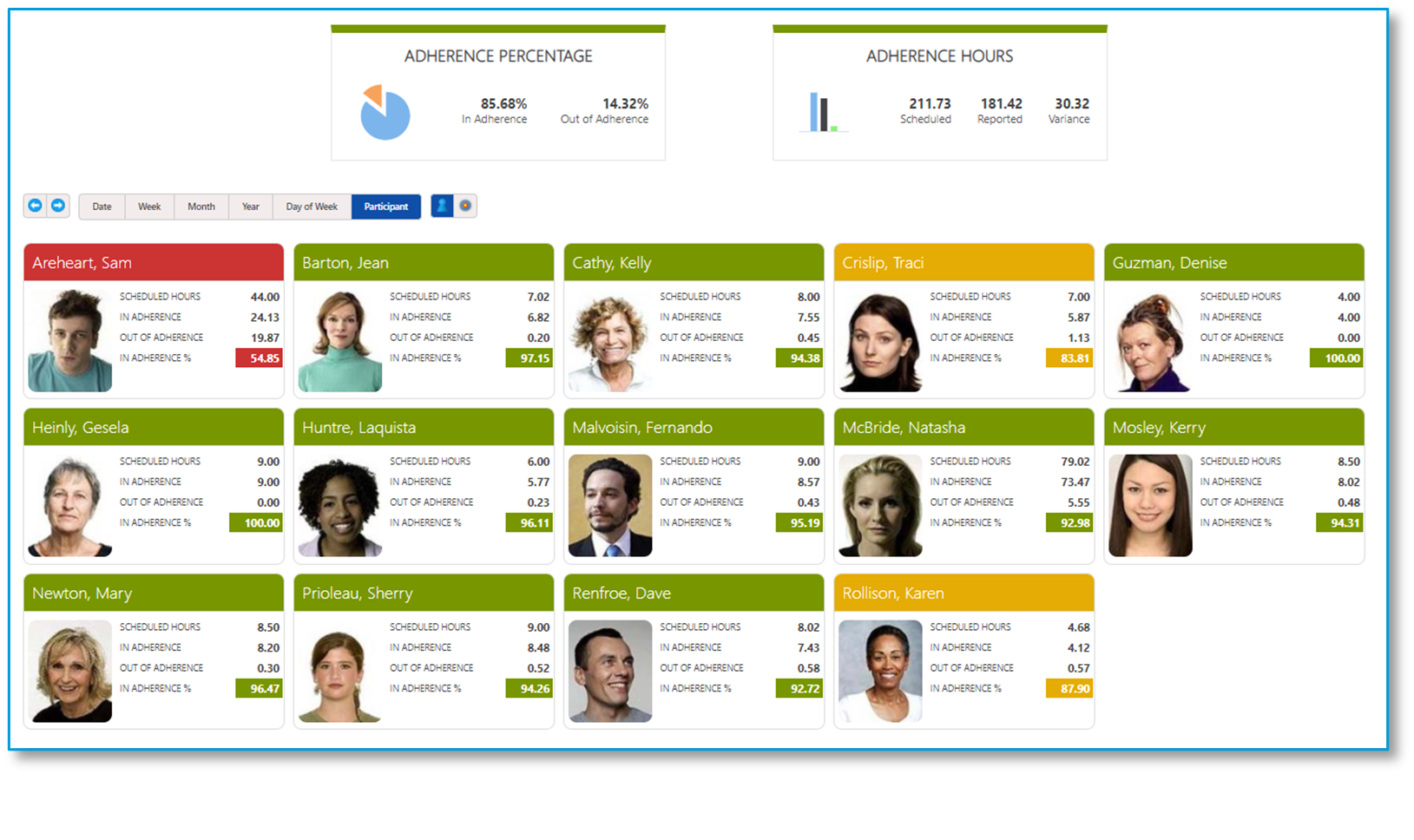
Adherence received a range of updates including new summary data compilations, new reporting based upon those data sets, new home page components for agents, and updates to the Schedule Adherence Monitor.
You might think the adjacent report is a new version of Adherence Alerts, but it’s actually a summary view of adherence data that can be run for months at a time to see overall agent adherence performance.
It looks like I need to take a closer look at 3 of my agents!
Schedule Adherence Monitor
The Schedule Adherence Monitor received a useful new addition. In addition to its familiar adherence status rings, Schedule Events and Device States now have their own charts with the same 1-click drill-down reporting. Toggle between views or arrange them across the component as seen below. Seeing everyone currently in a “meeting” or “unknown” phone state couldn’t be easier.
Summary adherence data
Adherence received a significant update enabling an entirely new summary class of data for Enterprise 5.0. Summary processing of schedule and adherence data is now conducted at regular intervals resulting in new summarized data sets. New reports based on the summary data allows enterprise-wide reporting of a year’s worth of data in seconds. Agent State Transactional detail will continue to roll off the system based on existing data policy parameters, but new summarized data can be maintained for years.
Summary reporting
Of course, with a whole new class of data available we didn’t just add a simple historical report, but added many useful, zoomable, drill-down enabled views of data that span the Enterprise Model, Organizational, or Custom Groups reporting classes. There are dozens of new reports.
Agent adherence dashboard
CommunityWFM 5.0 adds a new component to the agent desktop portal. Agents now have their own adherence dashboard to see summary data for daily, weekly, and monthly adherence scores.
Reporting Enhancements
Reporting has received usability and graphical enhancements. Reports now use a pop-out report options section within the report. No more orphan options pages! Additionally, new charting tools enable users to hide or highlight selected data sets in the legend.
Summary schedule reporting
In addition to the summary data enhancements for adherence, we have added the same functionality to all agent time reporting. Enterprise customers can now report on very large data sets quickly and easily. We have added dozens of new report combinations to enable you to get just the data you are looking for.
Data Collection Enhancements
CommunityWFM 5.0 is committed to connecting to the most popular communications platforms. In addition to a host of new data collection adapters, we have two new ways to work with historical data in CommunityWFM.
Community Cloud Connect
Community Cloud Connect is a restful service-based API allowing users to incorporate WFM data from any system. A restful API allows uploading both historical and real-time contact volume and agent state data to a cloud-based repository or your on-premises system.
Community Cloud Connect can work alongside standard collectors and can be used for less traditional WFM data sources such as internal back office or external partners who wish to share data feeds. Community Cloud Connect will be treated as an add-on and is priced consistently with other data collection interfaces.
Excel based import of historical data
Users now have the option to import historical data directly to CommunityWFM history using a wizard-based Excel import. Excel profiles have been a fast and easy way to use external data in forecasting, and we have now taken the same approach to uploading that data into Community’s historical contact volume repository.
Simply drop your spreadsheet in the file window, map your worksheet and columns, and import history into live queues or as standalone data that can be mapped to any of your activities.
Time-off Enhancements
The centerpiece of the CommunityWFM 5.0 release is the entirely redesigned time-off management capabilities.
-
Set up accrual schedules or upload from an external source to allot hours to agents.
- Track time off accruals (hours) within CommunityWFM – with automatic tracking and deductions of time off hours.
- Auto-approve or deny based on accrual balances.
- Time off slots calculated in hours rather than days.
- Ability to identify discrete agent groups for calculation against designated slots.
- Multi-round calendar bidding: Establish calendar partitions with time off rules where agents may bid for blocks of time.
- Calendar partitions with open selection (request time off without bidding).
Color-coded vacation calendars. - Track, reconcile, and report time off utilization.
Legacy mode
Upon upgrading from an earlier version of CommunityWFM, agents will be in a legacy mode. Legacy mode is designed to work consistently with current Community releases though agents will have access to more information. While the current process of requesting time off will be an option in 5.0, legacy requests will have some new features in CommunityWFM 5.0, starting with the agent’s new Time off overview. Accrual balances, scheduled time off, whether they are subject to a restricted activity plan, all in one place. A convenient menu on the left allows quick access to other options such as making a time off request and reviewing upcoming scheduled time off.
Viewable time off rules
Another feature in 5.0 includes the agent’s ability to view time off rules that govern their requests. Is that Monday a black-out day? How many agents are allowed to be off on Wednesday? Knowing the rules will help agent’s make decisions regarding their time off requests. Instant validation will inform not just whether the request may be approved or denied, but if denied – why. Agent’s may choose to go back and make changes to the request prior to submitting it.
Multi-day requests
There is now support for multi-day schedule events. This means that when an agent requests a multi-day time off event, it can be evaluated as a single request if desired, with all or nothing approval. The pending request worksheet also supports multi-day events.
Advanced vacation
When ready, you have the option to migrate some or all of your agents to the advanced vacation / calendar partition mode.
Time-off accrual policies
Time-off accrual policies allow users to earn or import accrued time such as vacation and sick time. CommunityWFM 5.0 uses those totals to compare requested time-off to earned allotments. These balances are widely available through a number of reports accessible to all roles, but most notably in the agent’s Time off overview.
Earned time can be calculated directly in CommunityWFM 5.0 using a range of business rules for differing employment types. Alternatively, values may be obtained through HR integration to the Community API or imported through a simple Excel wizard. Different departments can use differing approaches if that best suits the business needs.
Vacation bidding
Multi-round, vacation bidding is robustly supported. Calendar rules determine allowable block sizes, the number of agents who may bid at the same time, how many rounds of bidding, how much accrued time must be used in each round, along with a range of other options. Bid rounds are typically for a set period of time, after which the bids are approved or denied. After the bidding (or even instead of bidding), agents may access an open selection calendar with the same rules. Auto-approve or deny removes the manual process of handling vacation requests.
When participating in a partition, a calendar view will show the likelihood of whether an agent’s request will be approved. If participating in a bid round, agent’s will be able to view their rank in line and the time off requests of other agents who are higher in ranking order.
Bid rounds are typically for a set period of time, after which the bids are approved or denied. After the bidding (or even instead of bidding), agents may access an open selection calendar with the same rules.
After the bidding process is complete, CommunityWFM applies the time off to the agent’s schedules, seamlessly completing the process and streamlining the workflow.
There’s so much more
There’s so much more to see and experience in CommunityWFM 5.0! We hope you enjoy the enhancements as much as we’ve enjoyed creating them for you. As mentioned before, we look forward to your feedback as we continue to improve the platform.
We’ll see you in 5.0!